Computer network. Topology.
A computer network is a number of computers linked together to allow them to share resources (hardware, software and data).
Advantages of using computer network:
The ability to share devices such as printers. This feature saves
money.
Files can be easily shared between users.
Security
and Privacy - Users cannot see other users' files on the same
workstation.
If all data is stored on a server on the network,
then it is easy to back up the data.
Disadvantages of using computer network:
Buying network cables and file servers can be costly.
A system
administrator is required to manage the network.
If the server
goes down, the files become inaccessible.
Viruses can spread to
other computers on a computer network.
Hacking danger. You need
to use additional security software such as a firewall.
Local Area Network (LAN) - devices connected together usually within the same room or building. For example, a school or an office complex network.
Wide Area Network (WAN) - devices connected together over a large geographical area (global). WANs can be connected together using the Internet, leased lines or satellite links. For example, the Internet or a network of bank cash dispensers.
Network topology is a way of connecting nodes to a communication network.
Star topology.
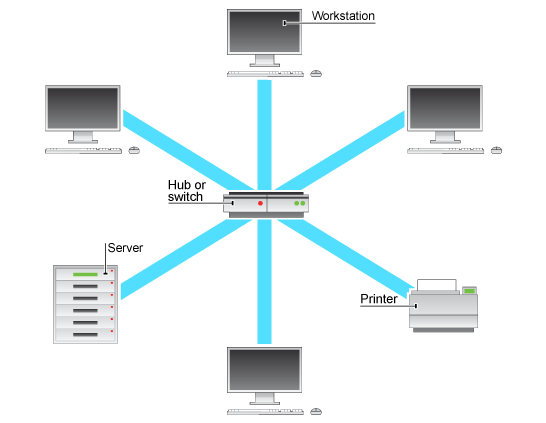
Description: Each computer is individually connected to a central point that can be a file server or switch. The central point that is used is usually a switch. Best used in a larger organization than a household if only because of the expense.
Advantages:
• Very reliable – if one cable or device fails then all the others will continue to work;
• Simple to troubleshoot because failures are localized;
• Adding devices doesn't affect speed of performance until server capacity is reached;
• Easy to upgrade or expand elements independently;
• High performing as no data collisions can occur;
Disadvantages:
• Uses more cable than any other design;
• Uses additional hardware (switches/hubs) which adds again to the cost;
• If the switch or hub fails, the whole element of the network supported by it crashes;
• If the server goes down, the whole network collapses;
• Can require more technical know-how to set up.
Bus topology
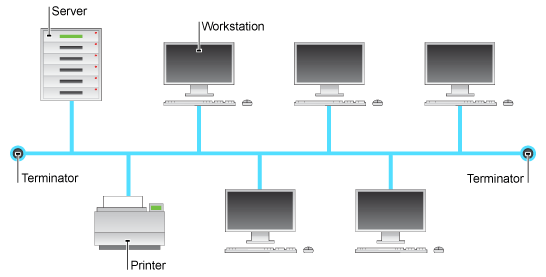
Description: Each machine is connected to a long, single cable which acts as a backbone to link all the devices in a network. Each computer or server is connected to the single bus cable through a connector called a T-piece. A terminator is required at each end of the bus cable to prevent the signal from bouncing back and forth on the bus cable. Best used in small or temporary networks - can be a useful home network solution.
Advantages:
• Simple and cheapest to install;
• Requires less cable length than star topology;
• Good for a temporary work;
• Flexible because elements can be removed or added without messing with the rest of the network.
Disadvantages:
• If the bus (spine) fails, the whole network crashes;
• Performance is affected by load - the more devices attached, the slower it functions;
• Bus cables are limited in length and must be terminated properly to avoid reflection of signal, which can crash the system;
• Data has to 'queue' sometimes because the bus is busy with other demands.
Ring topology
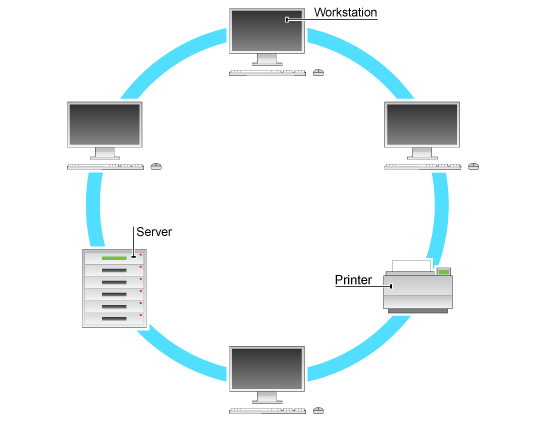
Description: Network where every device has exactly two neighbors for communication. Ring topologies allow packets to travel only in one direction.
Advantages:
• All data flows in one direction, reducing the chance of packet collisions;
• A network server is not needed to control network connectivity between each workstation;
• Data can transfer between workstations at high speeds;
• Additional workstations can be added without impacting performance of the network.>
Disadvantages:
• All data being transferred over the network must pass through each workstation on the network, which can make it slower than a star topology;
• If the main cable fails or any device is faulty then the whole network will fail.
Mesh topology
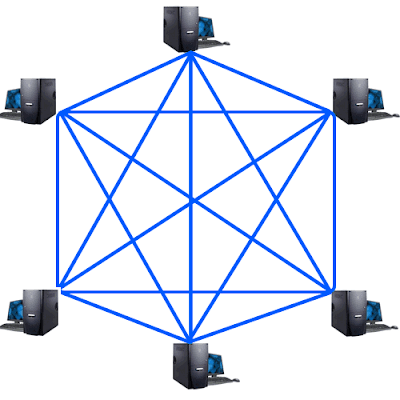
Description: In a mesh network topology, each of the network nodes, computer and other devices, are interconnected with one another.
Advantages:
Data can be transmitted from different devices simultaneously. This topology can withstand high traffic;
Even if one of the components fails there is always an alternative present. So data transfer doesn’t get affected;
Expansion and modification in topology can be done without disrupting other nodes.
Disadvantages:
There are high chances of redundancy in many of the network connections;
Overall cost of this network is way too high as compared to other network topologies;
Set-up and maintenance of this topology is very difficult. Even administration of the network is tough.