Theme. Operating systems
Operating system - a system program that controls and organises the general operation of the computer and provide user interface.It manages input to and output from the processing unit, run applications and etc.

The OS acts as a bridge between the application software and the computer hardware. Do users need application software to carry out tasks? the software needs the operating system to communicate with the hardware.
The OS controls the operation of the processor and memory, by managing the resources so that each application is allocated enough processor time and power, memory, and hard drive space to complete its job. In this, the OS is like a referee, ensuring everyone plays a fair game.
The OS controls any peripherals, like printers, scanners, and barcode readers that are attached to the computer. It will use specialized drivers to ensure that the right instructions are passed in a way that the device can operate.
The OS controls security - logins and sometimes basic firewalls and anti-virus facilities are run through the OS.
The OS provides a foundation for all application software to run, allowing software developers to write for an operating system rather than a computer design, as was the case in the early years of computer development. This is because each OS has a standardized API (application program interface).
The main functions of the operating system:
- Provides an interface for computer interaction: The operating system provides a user interface for interaction with the computer. This can be a graphical user interface (GUI) or a command-line interface (CLI).
- Controls of inputs and outputs (Handling I/O operations): The operating system controls the input and output operations of the computer. It manages the flow of data between the computer and its peripherals, such as printers, scanners,
keyboards, and mice.
- Manages of hardware and peripherals: The operating system manages the hardware and peripherals of the computer. It handles device drivers and other low-level hardware operations.
- Manages file system: The operating system manages the computer's file system. It controls the creation, deletion, and modification of files and directories.
- Manages resources allocation: The operating system manages the allocation of resources, such as CPU time, memory, and disk space. It ensures that each running program gets a fair share of resources.
- Manages memory: The operating system manages the memory of the computer. It controls the allocation and deallocation of memory to running programs and ensures that they do not interfere with each other.
- Manages processor for multitasking: The operating system manages the processor for multitasking. It allows multiple programs to run simultaneously on the same computer.
- Manages running software: The operating system manages the installation and loading of software onto the computer. It controls the execution of programs and their interaction with the hardware.
- Detects errors and handling: The operating system detects errors that occur in the computer system and handles them appropriately. It provides error messages and options for recovery.
- Provides data integrity: The operating system ensures the integrity of data on the computer. It provides mechanisms for backup and recovery in case of data loss.
- Provides security: The operating system provides security features, such as access control and authentication, to protect the computer system from unauthorized access and malicious attacks.
Examples of OS: Windows, Mac OS, Linux, Unix, MS-DOS, Android, iOS, and others.
Operating system - a system program that controls and organises the general operation of the computer and provides a user interface.
The main type of the operating system:
Single user OS - operating systems that can only be used by one user at a time. Example: DOS, Windows, Linux
|
Advantages |
Disadvantages |
|
Supports one user at a time Easy to maintain Less chance to damage Concentrate on one task |
Tasks take longer time to complete Idle time is higher |
Multi-user OS - allow lots of users to share data and resources at the same time. This is called a network.
A server controls how the computers run and communicate.
The server needs a Network Operating System (NOS), for example, Microsoft Windows Server, UNIX, Linux, Mac OS X, Novell NetWare, BSD
|
Advantages |
Disadvantages |
|
Highly stable centralized servers Security concerns are handled through servers Server access are possible remotely from different locations and types of systems |
Servers are costly User has to depend on central location for most operations Maintenance and updates are required regularly |
Single-tasking OS - when a single program is allowed to run at a time. Example: DOS.
-
-
Advantages
Disadvantages
This operating system occupies less space in memory
It can perform only a single task at a time
No protection between the OS and user programs
Files have no "ownership"
-
Multi-tasking OS - when multiple jobs are executed by the CPU simultaneously by switching between them.
-
-
Advantages
Disadvantages
Timesharing
Handle multiple users
The user can use multiple programs
Efficient virtual memory
CPU idle time can be reduced
Limitation of memory
Limitation of the processor
CPU heat up
Reliability problem
-
Real-time operating system (RTOS) - a data processing system in which the time interval required to process and respond to inputs is so small that it controls the environment.
Examples:
-
flight control system
-
the patient life support system in intensive care (heart rate monitoring)
-
radar systems
-
satellite monitoring systems
The advantages of real-time operating systems are as follows
-
Maximum consumption
-
Task Shifting
-
Focus On Application
-
Error Free
-
Memory Allocation
The disadvantages of real-time operating systems are as follows
-
Limited Tasks
-
Use Heavy System Resources
-
Complex Algorithms
-
Device Driver And Interrupt signals
-
Thread Priority
A Network Operating System runs on a server and provides the server the capability to manage data, users, groups, security, applications, and other networking functions. The primary purpose of the network operating system is to allow shared file and printer access among multiple computers in a network, typically a local area network (LAN), a private network, or other networks.
Examples of network operating systems include Microsoft Windows Server 2003, Microsoft Windows Server 2008, UNIX, Linux, Mac OS X, Novell NetWare, and BSD.
The advantages of network operating systems are as follows:
-
Centralized servers are highly stable.
-
Security is server-managed.
-
Upgrades to new technologies and hardware can be easily integrated into the system.
-
Remote access to servers is possible from different locations and types of systems.
The disadvantages of network operating systems are as follows:
-
High cost of buying and running a server.
-
Dependency on a central location for most operations.
Batch processing operating system Operating System collects the programs and data together in a batch before processing starts.
An operating system does the following activities related to batch processing:
-
The OS defines a job that has a predefined sequence of commands, programs, and data as a single unit.
-
The OS keeps many jobs in memory and executes them without any manual information.
-
Jobs are processed in the order of submission, i.e., first come first served fashion.
-
When a job completes its execution, its memory is released and the output for the job gets copied into an output spool for later printing or processing.
Advantages
-
Batch processing takes much of the work of the operator to the computer.
-
Increased performance as a new job get started as soon as the previous job is finished, without any manual intervention.
Disadvantages
-
Difficult to debug programs.
-
A job could enter an infinite loop.
-
Due to the lack of a protection scheme, one batch job can affect other pending jobs.
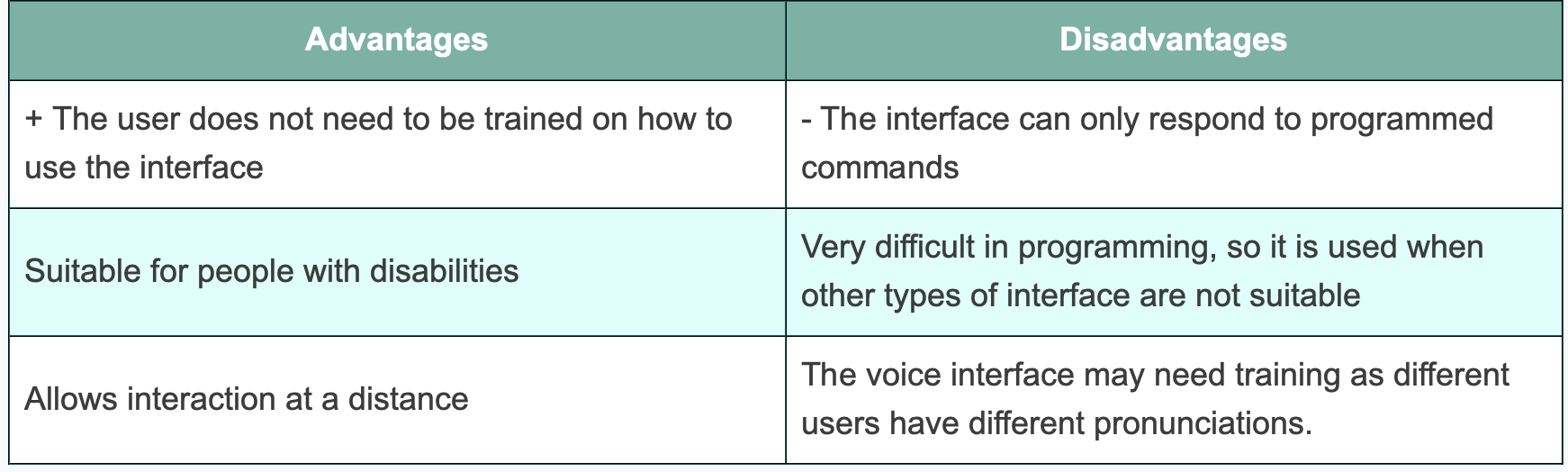
The user interface is the means of interaction between the user and the computer system.
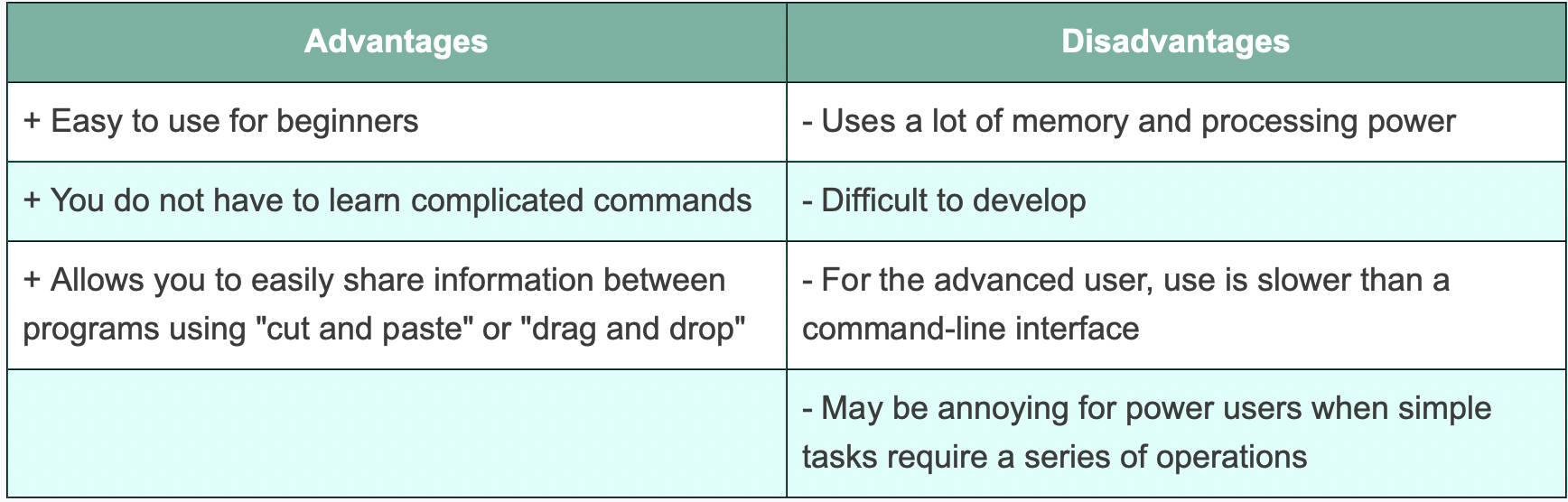
Graphical User Interface - the user usually executes commands with graphical objects of the system - WIMP (Windows, Icons, Menus, Pointers) using the mouse pointer or touchpad for interaction. Examples, Windows, MacOS, etc.
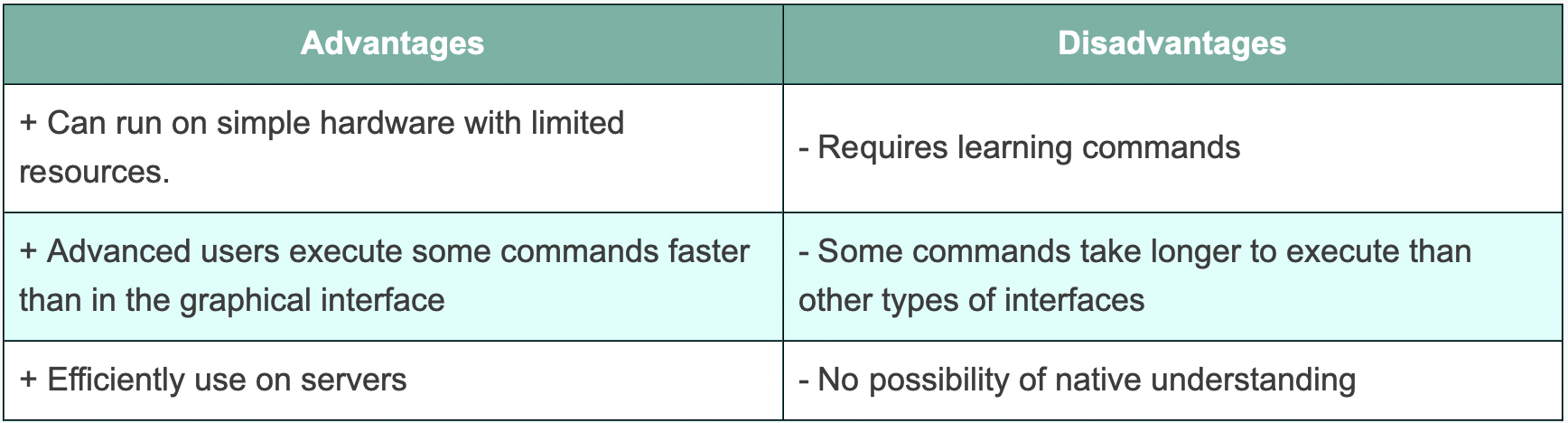
Command Line Interface - User interaction with the command line interface occurs by entering commands designed to perform specific operations. Example: MS-DOS
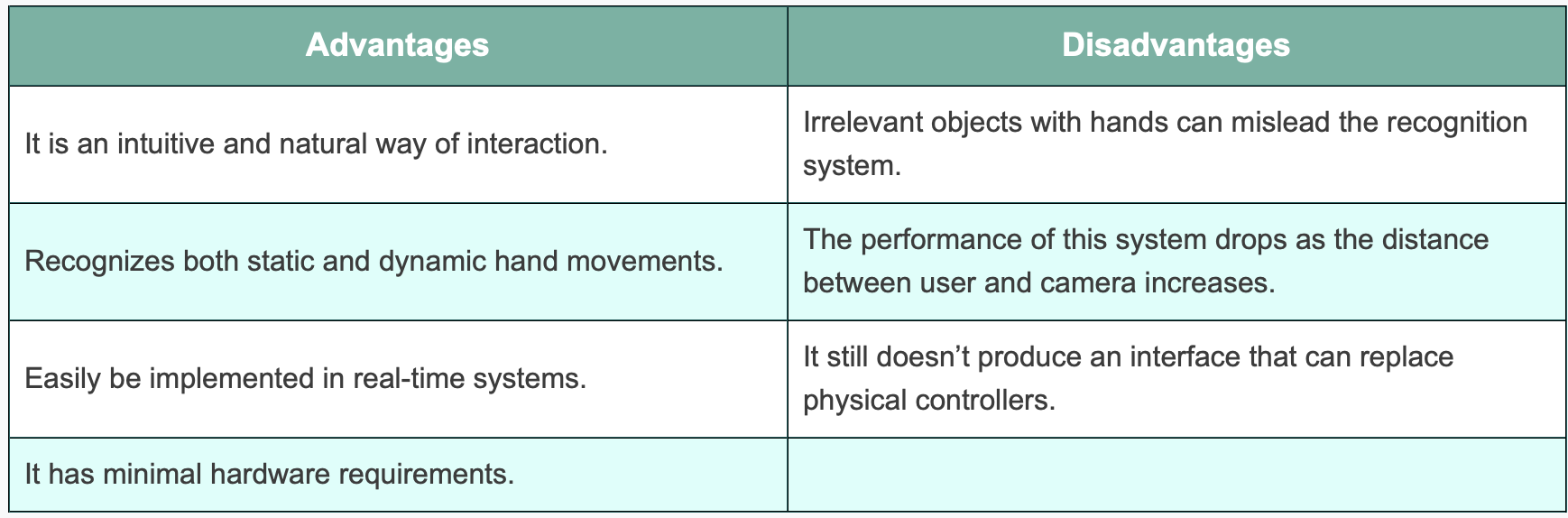
Gesture Recognition Interface includes the ability of the system to recognize hand gestures (movements) and even recognize emotions by face. Examples: Wii, Microsoft's Kinect